The end-of-month question, on one screen
A dashboard the client actually reads. Not a report they file away.
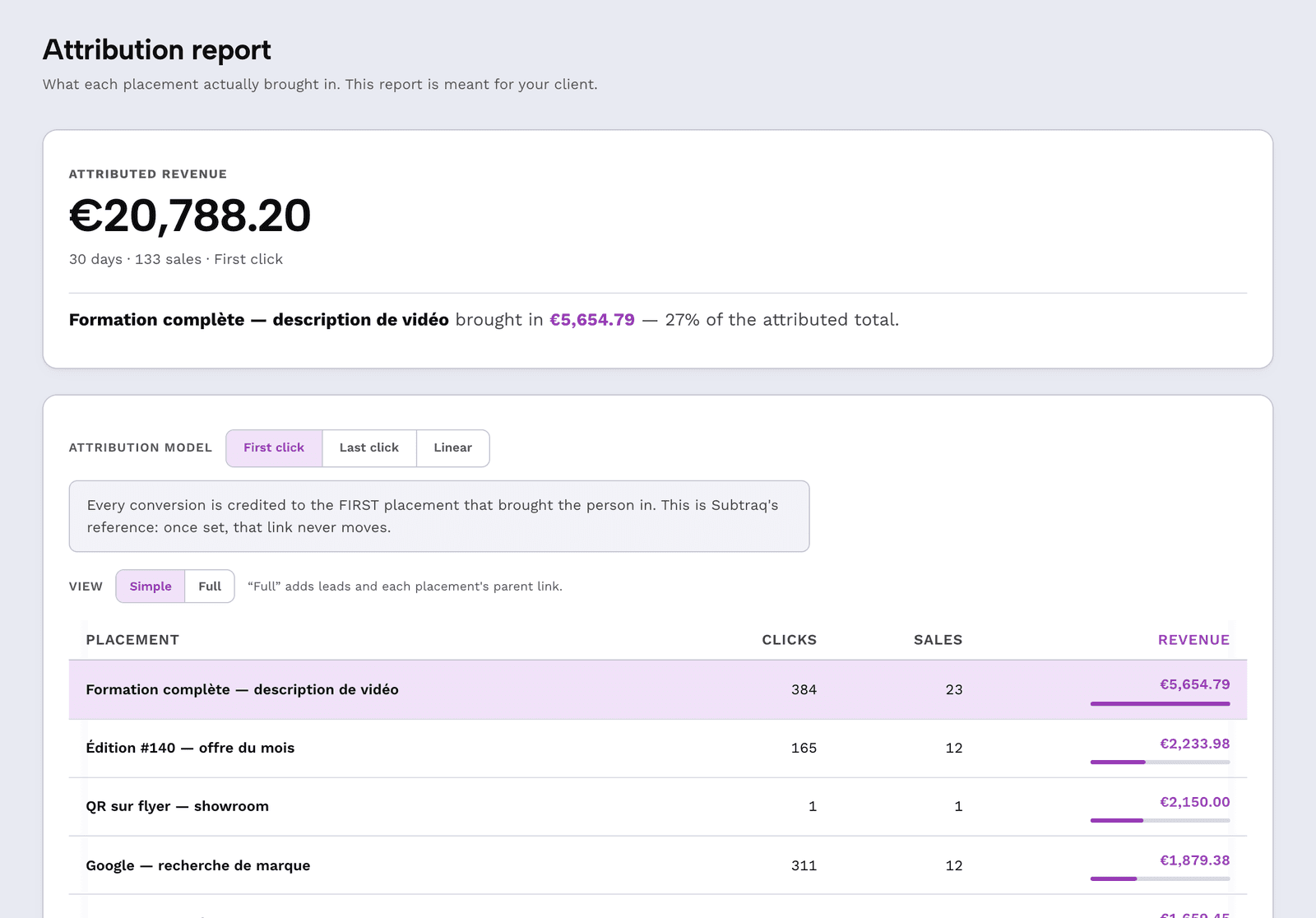
A marketing dashboard fits on one screen and reads in ten seconds: the revenue generated, the channel that drove it, the link that converted. A client does not read a forty-page report — they’re looking for one number, and they give up if they can’t find it.
Three sentences. Always the same.
“I spend two hours a month making a report nobody opens.”
“They compare my numbers to their Analytics, and the two never agree.”
“When I ask for budget renewal, all I have to show is impressions.”
The objection, in their words
My client doesn’t read my reports.
Because a report that starts with impressions requires effort before it delivers an answer.
This one starts with the month’s attributed revenue. Everything else is below, for anyone who wants to dig — and nobody needs to dig in order to decide.
The report sections
Four pieces, and the order matters as much as the content: the answer first, the proof second.
The month’s attributed revenue
Up top, large, with the period. It’s the only line most clients will read, and it answers the question they’re asking.
What produced it, placement by placement
Each link distributed, its channel, what it brought in. You can then say “the story of the 12th brought in $2,100” instead of “stories are doing well.”
Unattributed, shown alongside, never inside
A sale with no originating click is counted and shown separately. The total adds up, and nobody suspects you of rounding.
Your name, your logo, your domain
From the Solo plan, on your own address, the document says nowhere that it comes from us. It’s your deliverable.
What it looks like
A report on a single screen
The report opens with a link. No twelve-megabyte attachment, no password to dig up, no account to create — three things that keep a report from ever being opened.
It reads on a phone, because that’s where an executive opens emails between meetings.
What this document is not
It’s not access to your account: the client opens a link, read-only, without creating anything, and sees only their own numbers. The link stays up to date: they reopen it whenever they like, without asking you. And each client has their own — that’s what client workspaces are for.
See client workspaces1
screen, and the number is on it
0
account to create to open it
∞
reports per client, no extra charge
« A client doesn’t want to know what you did. They want to know what it brought in. »
Send your first report this month
A demo workspace is already filled with sample data: you can see what the document looks like before connecting anything.
Open the demoThe white-label report, on your own address, is included from the Solo plan.