How it works
Four steps between your link and the sale. Not one line of code.
Four beats, and not one line of code on your client's site. Here is what each one does — and what happens inside the machine meanwhile.
The journey, in four beats
- The linkYou create a short link and put it where you publish.
- The clickSomeone clicks. The visit is counted, and a thread stays attached to the person.
- The leadYour form sends the person back to us after submission. The thread is read again.
- The saleYour checkout reports the payment. The sale rejoins the link that produced it.
Each beat fits in one sentence. The four sections that follow take them one by one, with what happens under the hood.
Beat 1 · The link
A short link on your own domain
You create the link with us, then point it at what you already have: your sales page, your form, your calendar. Nothing is changed at the destination, and nothing is placed on your client's site.
Vous le collez ensuite là où vous communiquez : une bio, une description de vidéo, un mail, un QR code au dos d'un flyer. Un lien par endroit, et vous saurez lequel travaille.
The short address never moves again; the destination, on the other hand, can be edited after publishing.
A ledger replicated around the world
Every link is copied into a ledger that Cloudflare replicates everywhere. The redirect is decided there, without ever consulting the database — that is why a link still works while the server is off.
The click
What happens between the finger pressing and the page opening. Three things, and the order matters.
The page opens first
The redirect is served as close to the person as possible, from the replicated ledger. Counting starts AFTER the response: it has no right to delay it, and a measuring outage never costs a visit.
It is the visit that is counted, not the person
The IP address is read in memory to recognize the country and rule out robots, then thrown away: it is never written down. Of the referrer, only the hostname is kept — never the path, which can carry personal data.
A thread stays, on our own domain
A cookie written by the server, containing only an identifier for a click already recorded with us. Thirty days at most, no page script can read or forge it, and it is only set if someone clicked a measured link.
Beat 3 · The lead
They fill it in. The link follows them.
The thread left at the click disappears as soon as the person browses on — and the form you want to measure comes precisely three pages later. That is why we send them back through us: your form redirects to a Subtraq link after submission, the thread is read on the way, and the response becomes a lead tied to its link.
The move is the same everywhere. Each guide gives the exact path taken from the tool's official documentation, with its date: an interface changes, and an invented path wastes more time than no guide at all.
If your client has a developer, the same thing is done through our tag, which sends the email address or the account identifier. The amount, however, is refused at that point: a sum posted from a browser is a sum anyone can write.
Redirect on completion → URL
A Subtraq link in place of your thank-you page. The field already exists in Tally, Typeform, Calendly, Cal.com, Systeme.io, Brevo and Elementor — only its name changes from one tool to the next.
Beat 4 · The sale
They pay. We know where they came from.
A payment goes through. Stripe tells us, or your client's tool calls our interface — in both cases from a server, never from a browser. That is the only way an amount is anything other than a claim.
Then the sale goes looking for its link. If it finds one, it attaches to it. If not, it is recorded as unattributed, and it is shown as such.
Two doors, both on the server side
Stripe sends its payments to an address pasted into its dashboard: the signature is mandatory, and the address key grants nothing on its own. The other door is a server-key interface, in cents — never a decimal number on money.
The attribution engine
Three non-negotiable rules
A report is only worth something once you know what it refuses to do.
First click wins, and nothing moves it
Once the first touch is set on a person, it is settled. The later ones are all recorded, but to read the same sale differently — last touch, split — never to rewrite the first.
We never manufacture an origin
No known click in the window, no attribution: the event is recorded as unattributed and the report says so. A report that invents a plausible origin is worse than an incomplete one.
A click belongs to its workspace
An identifier picked up elsewhere credits nothing here, and a robot's click never credits a sale. Robots are labeled on arrival, never deleted, and the detection rules are published.
At the end of the four beats
One link. No password.
The attributed revenue for the period at the top, then what produced it, placement by placement. It opens without creating an account, and you set its password as well as its expiry date.
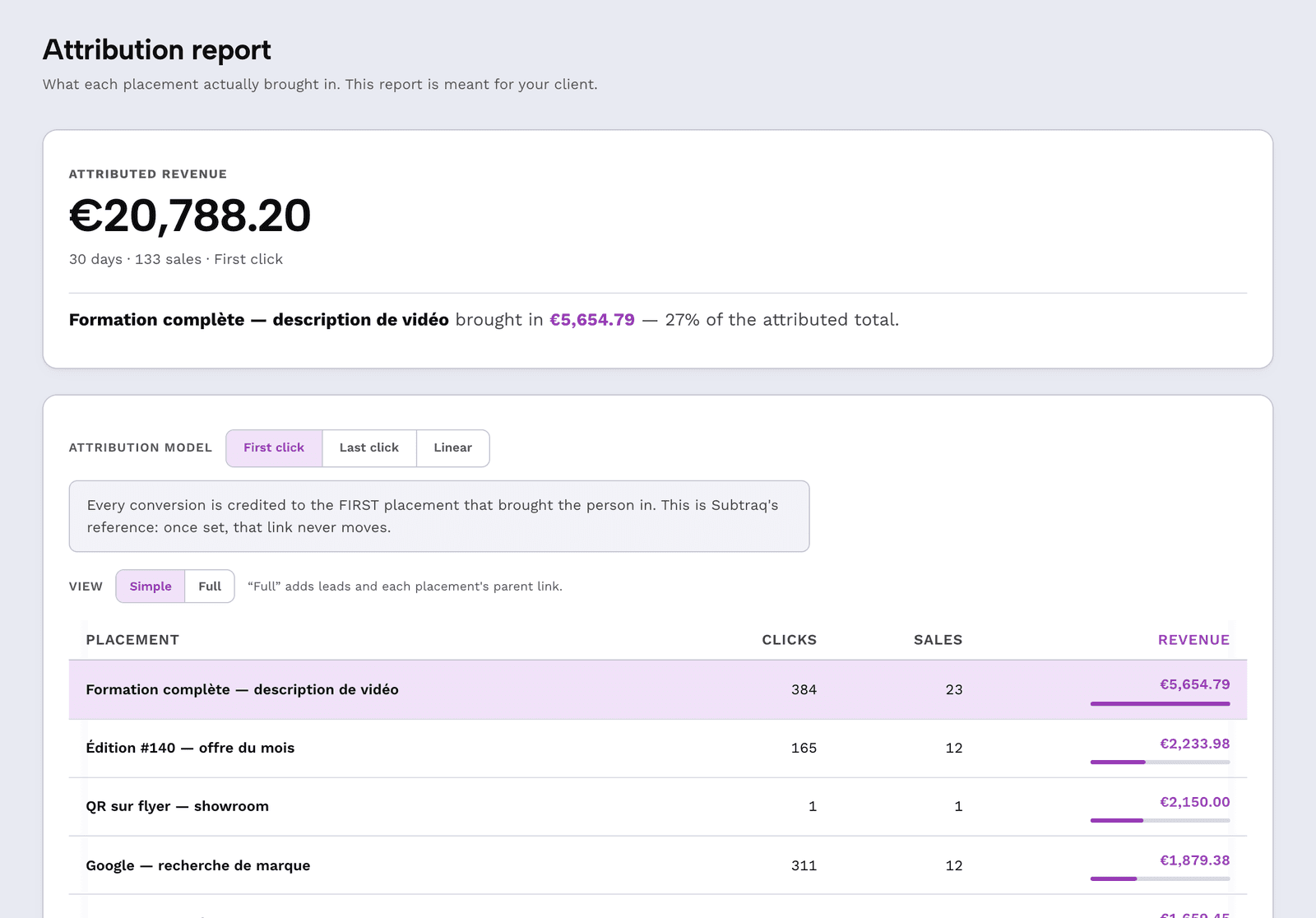
The sorting
The report sorted by channel
The channel is never guessed behind anyone's back: it is offered to you when you create the link, from what you indicated. The report then sorts on its own.
The three common objections
“So I have to install something at my client's?”
“And if your server goes down, do my links go down with it?”
“A cookie, so a consent banner?”
Frequently asked questions
How long does a click stay attachable to a sale?
The attribution window is set per client workspace, and the thread left at the click never exceeds thirty days — even if a workspace gives itself a longer window.
What happens if no click matches the payment?
The sale is recorded as unattributed and appears as such in the report. No origin is invented to fill the gap: that is a rule of the engine, not a setting.
Do robot clicks distort the figures?
Dashboards show only human clicks by default, with a switch to show the others. A robot's click never credits a sale and does not count towards the billed monthly quota.
Can the same payment be counted twice?
No. Through the programming interface, the invoice number makes a replayed send a no-op; through Stripe, it is the payment identifier that settles it.
Can you change the destination of a link already out there?
Yes, whenever you want. The short address does not change: what is printed, published or pasted in a bio keeps working.
Your first link in 2 minutes
Create a link, paste it into your form's redirect field, connect the checkout. The free plan is enough to watch the first sale rejoin its link.
Create a free account